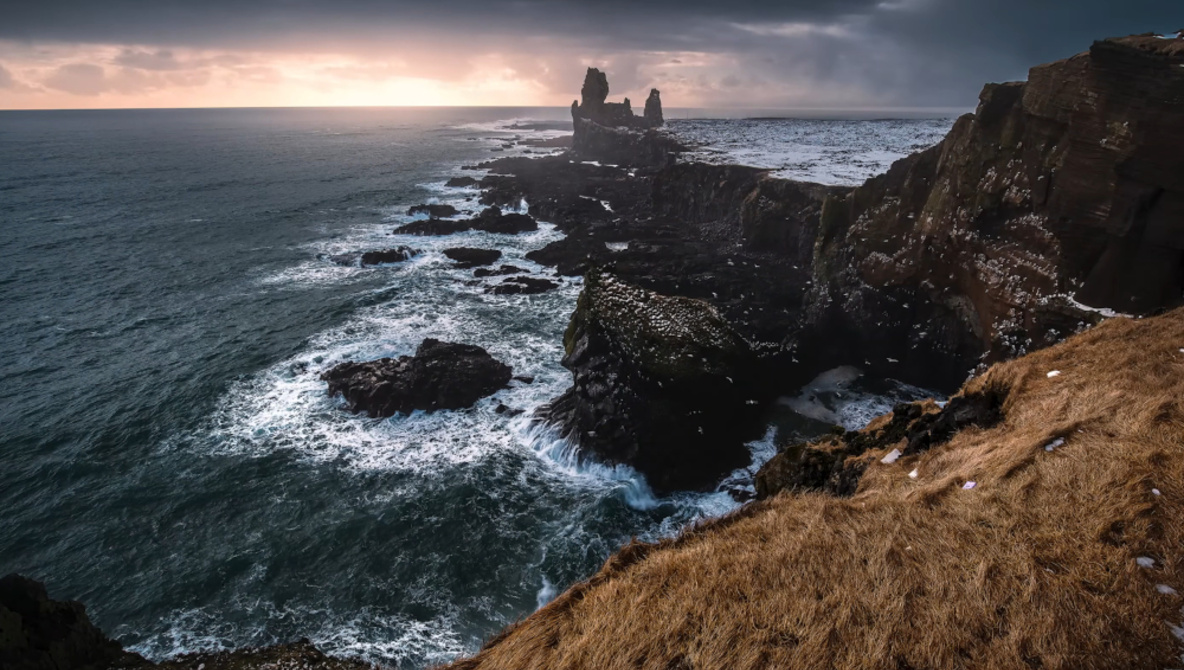
UPDATE: A groundbreaking tutorial released today reveals powerful Lightroom techniques that transform flat landscape images into stunning, cinematic visuals. Photographer Möhrle demonstrates a full editing process that not only enhances the mood but also saves valuable editing time using advanced tools like generative AI.
In this urgent release, Möhrle emphasizes the importance of cleaning raw files before diving into creative adjustments. He employs Lightroom’s Remove tool, utilizing the dust option to swiftly eliminate sensor spots, followed by generative AI to seamlessly remove distracting elements from the scene. This critical step allows photographers to focus on crafting the atmosphere rather than getting bogged down by tedious cleanup.
The tutorial progresses into the Basic panel, where Möhrle establishes a dark, low-contrast foundation. He strategically lowers exposure and highlights, controlling bright elements like the sky and water while maintaining overall darkness. By warming the global white balance, he sets the stage for more precise adjustments later, ensuring each element receives the optimal treatment.
Möhrle’s expert use of Lightroom’s masking tools stands out as he divides the scene into manageable sections. He utilizes Landscape masks to enhance foreground vegetation, increasing clarity and brightness to create a defined entry point for viewers. The sky receives meticulous attention with stacked linear gradients, allowing for cooling and darkening without sacrificing clarity.
In a striking visual demonstration, radial gradients are applied to create a glowing effect on the left, simulating a light source behind rocks. This approach not only adds depth but also illustrates how photographers can manipulate light and shadow as distinct shapes rather than relying solely on global adjustments.
The tutorial continues with targeted masks for various elements, including rock faces and fast water. Each component is adjusted to sit within its unique tonal range, resulting in a harmonious blend of colors and textures. Möhrle successfully contrasts the crispness of the rocks against a soft, glowing background while enhancing the water’s rich blue tones.
The finishing touches involve intricate adjustments using the Color Mixer, split toning, and calibration to refine the hues of oranges, yellows, and blues throughout the image. Möhrle concludes the process with careful sharpening, ensuring that details pop while maintaining the smoothness of other areas.
For those looking to elevate their landscape photography, this tutorial is a must-watch. The techniques demonstrated by Möhrle not only revolutionize editing in Lightroom but also provide valuable insights into creating emotionally engaging photographs that resonate with viewers.
Don’t miss the full tutorial available now, and join the wave of photographers transforming their editing processes with these innovative techniques. Follow Alex Cooke for more insights on photography and related topics.